 Elena Papadakis
Editor-in-Chief
duaa Phone Case QC Photos: Verify Model, Cutouts, Edges
Before shipping, when reviewing QC photos, the key is not to judge whether the phone case "looks good," but to confirm that the photos correspond to the correct product, model, and variant. For duaa phone cases, buyers should first verify the phone model, color, camera area, buttons, and port openings, and then assess whether there are clearly visible flaws on the surface. However, the QC evide
Updated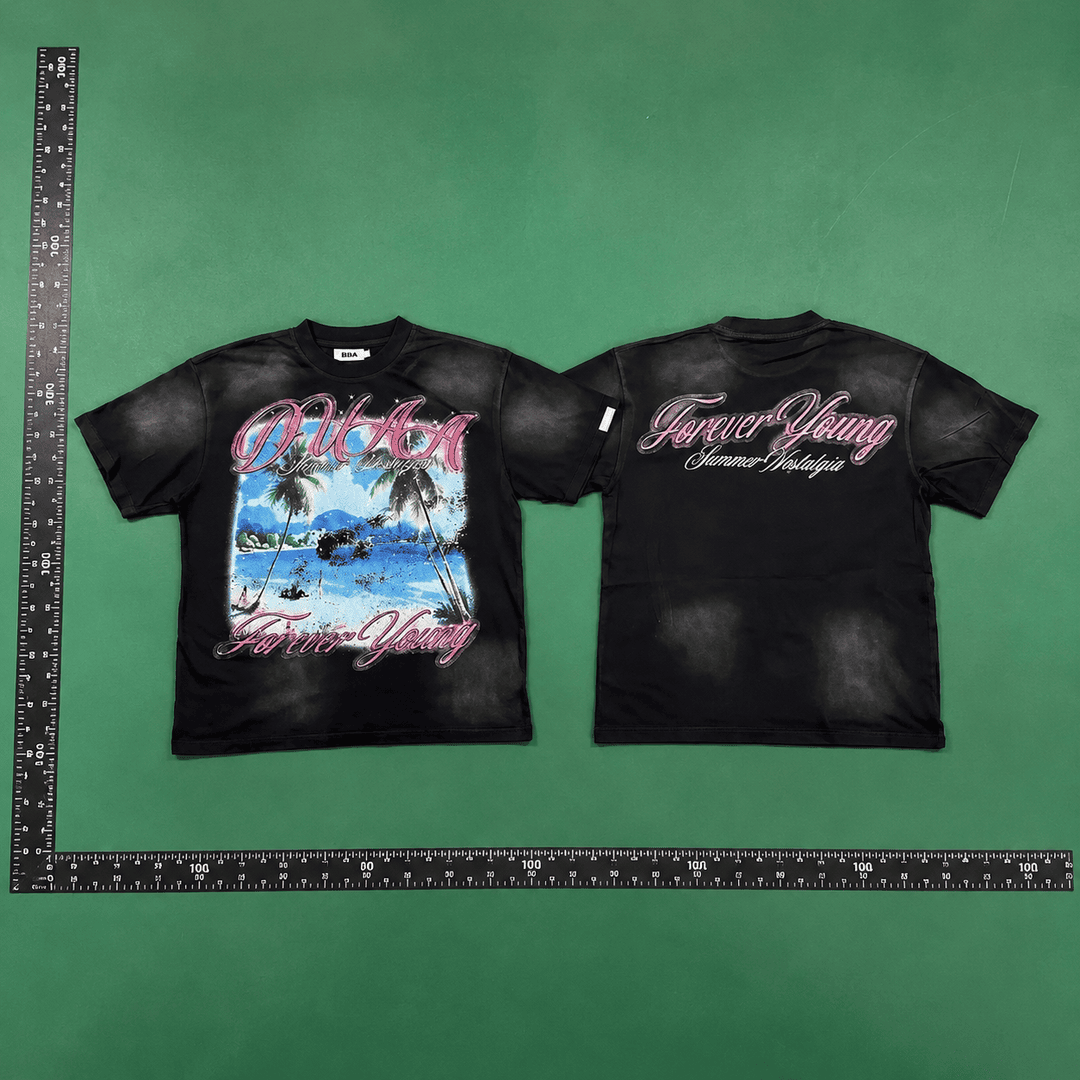
Before shipping, when reviewing QC photos, the key is not to judge whether the phone case "looks good," but to confirm that the photos correspond to the correct product, model, and variant. For duaa phone cases, buyers should first verify the phone model, color, camera area, buttons, and port openings, and then assess whether there are clearly visible flaws on the surface.
However, the QC evidence available for verification this time presents a clear mismatch: the existing source page displays DUAA printed short-sleeve T-shirts, listing items in black, white, khaki, and other variants, and does not provide product details for duaa phone cases or QC photos of the phone cases. Therefore, the following content can only serve as a verification process; the existing images cannot be treated as physical evidence of the phone case, and cannot be used to confirm the phone case's model, color, cutouts, material, or quality.

Step 1: Confirm the product corresponding to the QC photos
After entering the target product detail page, you should first record the following information:
- Product name or style name
- Phone brand and specific model
- Color or pattern variant
- Variant selection on the product detail page
- Product main image and detailed description
- Whether there is an entry called View QC Photos on the page
Only the gallery accessed by clicking View QC Photos from that product detail page can be used as QC reference for that product. Do not use brand pages, category pages, homepage, images of other products, or guessed QC URLs as substitutes.
The source text provided this time lists DUAA T-shirt SKUs, such as DUAA Beach Print Vintage Style Black T-shirt and DUAA Organ Print Street Style White T-shirt. Since these items are not phone cases, they cannot prove they are the same product as the target duaa phone case, nor can they be used to verify the phone case variant.
Step 2: Verify phone model and appearance variant
After confirming that the QC photos correspond to the target phone case, do not rush to check for scratches; first check whether the overall shape matches the phone model:
- Whether the length, width, and camera area of the phone case match the target phone
- Whether the number, arrangement, and size of lens openings match
- Whether the positions of the mute switch, volume buttons, and power button correspond
- Whether the charging port, speaker, and microphone areas have correct openings
- Whether the color and pattern in the photos match the selected variant
- Whether the front, back, and sides belong to the same style
If the model name is not shown, or the photos only capture parts, do not guess the compatible phone model based on appearance alone. Before the model is confirmed, pause shipping and request additional photos that show the complete shape and key cutouts.
Step 3: Check front, back, and edge coverage
The phone case should have clear front, back, and side photos at minimum. When checking, you can proceed in the following order:
- Check whether the back pattern is complete, with no obvious missing print, broken lines, misalignment, or large stains.
- Check whether all four corners are covered, and whether there is visible lifting, cracking, or deformation at the edges.
- Check whether the side button coverage areas are continuous, with no obvious gaps or positional offsets.
- Check the inside for foreign objects, obvious stains, residual glue, or bumps that affect fit.
- Compare the same position across multiple photos to confirm that apparent flaws are not visual effects caused by reflections, shadows, or shooting angles.
These checks can only identify appearance issues clearly visible in the photos, and cannot prove the material, durability, drop resistance, or long-term performance of the phone case.
Step 4: Inspect lens and port openings separately
The lens opening is the area that most easily affects fit judgment. Zoom in to check whether the edge of the opening is intact and whether it blocks the lens, flash, or sensor. If the photo resolution is insufficient to see the boundary between the opening and the lens, mark this item as insufficient evidence instead of assuming fit.
The port area also needs separate confirmation. Focus on whether the charging port is centered, whether the opening width is sufficient to avoid the port edges, and whether the speaker and microphone holes are visibly blocked. If the photo does not capture the bottom, you cannot judge that the port position is correct.
Step 5: Distinguish image facts from editorial judgment
It is best to divide the verification records into two columns:
Facts directly visible in the images, such as "the back pattern is visible in the photo," "there is a suspected light-colored mark in the lower right corner," "there is no clear photo of the bottom."
Editorial judgments, such as "the mark may be a reflection or a surface flaw," "it is currently impossible to confirm whether the port opening matches."
Only the first category can be directly described as results shown in the photos. The second category must retain uncertainty and cannot be written as confirmed defects, material issues, or quality conclusions.
What to request for additional photos when evidence is insufficient
If the QC gallery for the target duaa phone case lacks key photos, you can request:
- Photos showing the complete front
- Photos showing the complete back
- Photos of all four sides and four corners
- Close-up of the lens opening
- Close-up of the bottom port, speaker, and microphone areas
- Photos of the inside of the phone case
- Close-ups of suspected scratches, stains, missing prints, or misaligned decorations
- Screenshots or markings that prove the photos correspond to the specific model and color
If the model, cutouts, or variant cannot be confirmed even after additional photos, the safest approach is to pause shipping and request verification from the seller or shopping agent. Do not use images that do not match the target product as a basis for shipping.
Verification conclusion for this review
The provided source evidence corresponds to DUAA printed T-shirts, not duaa phone cases; the existing images and text are insufficient to confirm the phone case's model, color, cutout positions, edge condition, or appearance flaws. Therefore, this time we cannot make a specific QC judgment on the phone case, nor can we describe it as having passed inspection.
The next step needed to complete the verification is to enter View QC Photos from the target phone case detail page and obtain real QC original images that correspond to the specific model and variant. Until such evidence is provided, the model fit, lens opening, port position, and obvious flaws should all be marked as unconfirmed.