 Elena Papadakis
Editor-in-Chief
How to Find Verifiable moclose Electric Shaver on Mobile
When searching for a moclose electric shaver on your phone, the key is not just looking at the brand name in search results, but confirming three things: whether the result actually belongs to an electric shaver, whether the model field in the product details is consistent, and whether the copied link still points to
Updated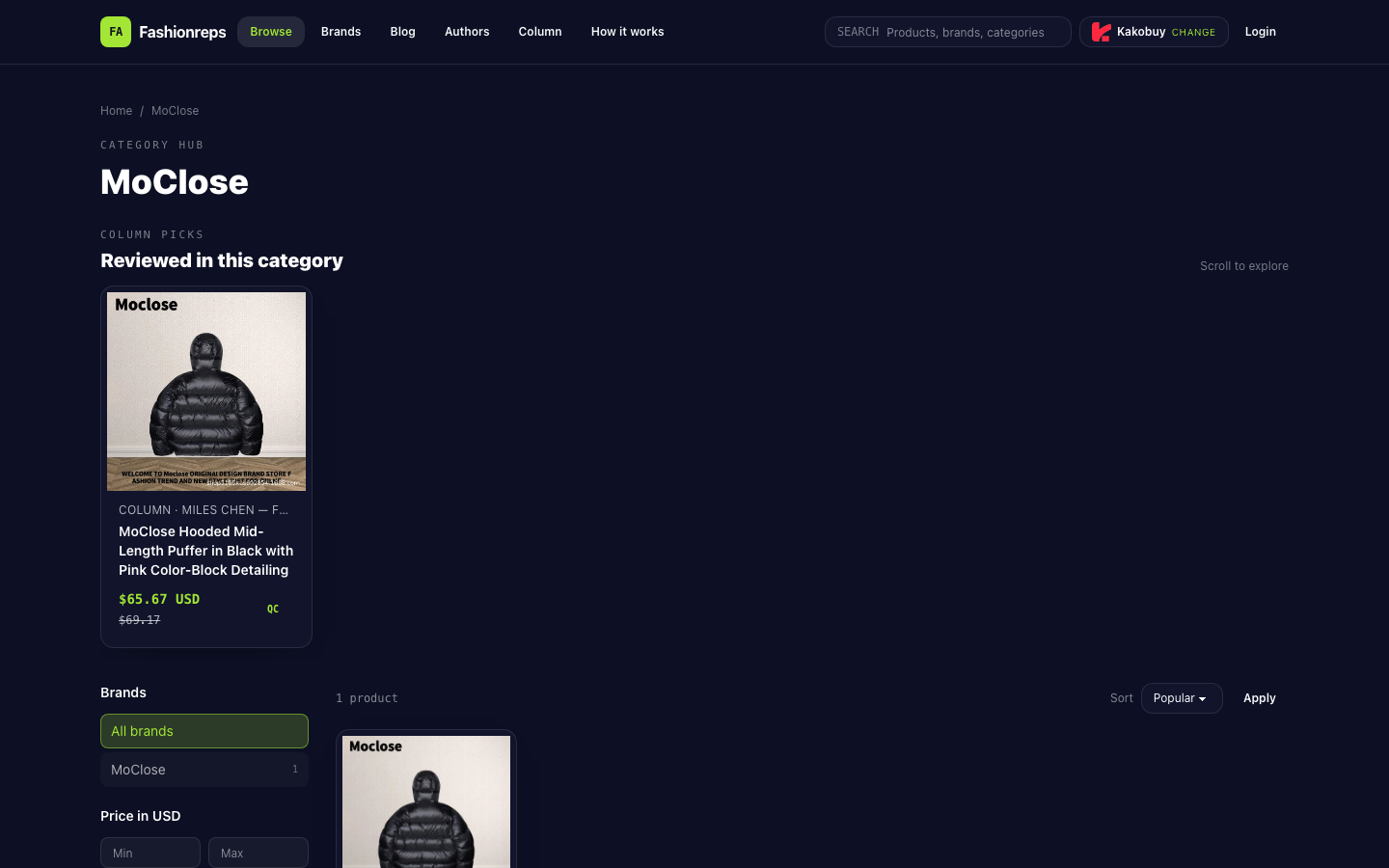

When searching for a moclose electric shaver on your phone, the key is not just looking at the brand name in search results, but confirming three things: whether the result actually belongs to an electric shaver, whether the model field in the product details is consistent, and whether the copied link still points to the same product.
As of October 30, 2026, when checking the MoClose page visible on Fashionreps, the page displays the MoClose brand category page. The currently visible product is a black and pink color-block hooded mid-length down jacket, with a reference price of $65.67, and the page also shows a previous reference price of $69.17. This page does not provide evidence of a moclose electric shaver product, so it cannot be considered a shaver candidate or purchase recommendation.
Step 1: Do an initial screening of results on mobile
After opening Fashionreps, enter the search or brand browsing entry and use as specific keyword combinations as possible, for example:
- moclose shaver
- moclose electric shaver
- moclose razor
- moclose shaver
First look at the product title and category on the result cards. Do not confirm just because "moclose" appears in the title. A candidate should at least meet the following conditions simultaneously:
- The title clearly points to an electric shaver, shaver, or similar product;
- The product image matches the appearance of a shaver;
- The page does not clearly show clothing, footwear, or other unrelated categories;
- Clicking through leads to the corresponding product details, not back to the brand category page.
If the search results are empty, or the results only show irrelevant products such as clothing, you should stop organizing these results into shaver candidates. The currently verified MoClose page belongs to the jacket category, and it cannot be inferred from this that the website already offers a moclose electric shaver.
Step 2: Verify identity fields on the product details page
After opening the candidate details page, record the information in order from top to bottom. Mobile page space is limited, so it is recommended to take screenshots or copy the text first, then compare item by item.
| Verification Field | What to Confirm | What to Do If Unable to Confirm |
|---|---|---|
| Brand | Is it clearly written as moclose or MoClose | Do not use the category page name as evidence of the product brand |
| Product Title | Does it indeed describe an electric shaver | Stop including if the title and image do not match |
| Model | Is there a specific model or style number | Mark as pending confirmation if missing; do not fill in on your own |
| Specification Fields | What blade head, power supply, or function information is actually shown on the page | Do not speculate about performance, battery life, or number of blades if not provided |
| Variants | Do colors, sets, or other options correspond to the current page | Keep original text if variants are unclear; do not replace with guesses |
| Product Link | Does it directly open the same product details page | Stop confirmation if it jumps back to category page or shows abnormal redirection |
The goal here is to prove that "this link corresponds to this product", not to evaluate product performance. When there is no page evidence, do not infer blade structure, battery life, waterproof ability, manufacturer, inventory, shipping, or final transaction price from images.
Step 3: Copy the link and verify the backlink relationship
After using the share or copy link function in the mobile browser, do not send the link to others immediately. You can perform a backlink check in the following order:
- Copy the product details page link.
- Open the link in a new tab or private window.
- Check whether the opened title, image, and model are consistent with the original page.
- Return to the original page, copy the link again, and confirm that the two links have not changed due to different variants.
- Put the link in the same record as the brand, title, model, and query time.
If the link opens to only the brand homepage, category page, blank page, or another product, do not mark it as a verified link. For pages with abnormal redirects, keep the original link and note the abnormality, waiting for the page to recover or regain verifiable product details.
What are the boundaries when using Google Sheets for follow-up organization
Mobile websites are better for discovering products and opening images, while Google Sheets is better for organizing multiple candidates. The two are not substitutes: the website page is the source of product evidence, and the spreadsheet is only a recording and filtering tool.
When there are few candidates, it is faster to verify them one by one directly on the mobile page; when you need to compare multiple search results, record different link statuses, or have multiple people supplement model fields, you can put the content you have already viewed into Google Sheets. It is recommended to use these columns:
- Query time
- Search keyword
- Brand displayed on page
- Product title
- Model original text
- Specification original text displayed on page
- Whether image matches
- Product details link
- Link back-open result
- Reason for pending confirmation
Filtering in the spreadsheet can only help you find records where "model is empty", "link did not open back", or "image did not match". It cannot replace verification on the product details page, nor can it automatically prove inventory, price, or manufacturer information. Do not fill in parameters in the spreadsheet that are not provided on the page.
Three situations where you should immediately stop making specific assertions
First, the search yields no results, or only irrelevant products such as clothing. In this case, you can only record "no verifiable candidates found on the current page", and cannot treat the brand category page as the target product.
Second, the product title, image, and specification fields contradict each other. For example, the title says shaver, but the image shows another category, or the model only appears in the search snippet but not on the details page. In this case, keep it as pending confirmation and do not choose one field as the correct answer on your own.
Third, the copied link jumps to a different product, category page, or cannot be opened. Until the link stably returns to the same details page, do not use it as a purchase recommendation, nor claim that product identity confirmation has been completed.
What is currently confirmable is: the verified MoClose visible page on Fashionreps displays a jacket, not a moclose electric shaver. To form a valid candidate, you need an actual product title, details fields, and a corresponding link that opens back to a shaver product.