 Elena Papadakis
Editor-in-Chief
Inter Milan Jersey QC: Sponsor and Patch Checks
Before buying an inter milan jersey, the first thing to check in QC pictures isn't "does it look right," but whether the images match the exact style and variant you selected. For this item, the verified page name is "Inter Milan White Retro-Style Football Jersey With Numbered and Sock Bundle Options," and the QC page shows two styles, listing SKUs: SPU-LYWOKKCXM9 and SPU-7UZN8TOP0P. Based on this page information alone, you can't confirm each SKU's
Updated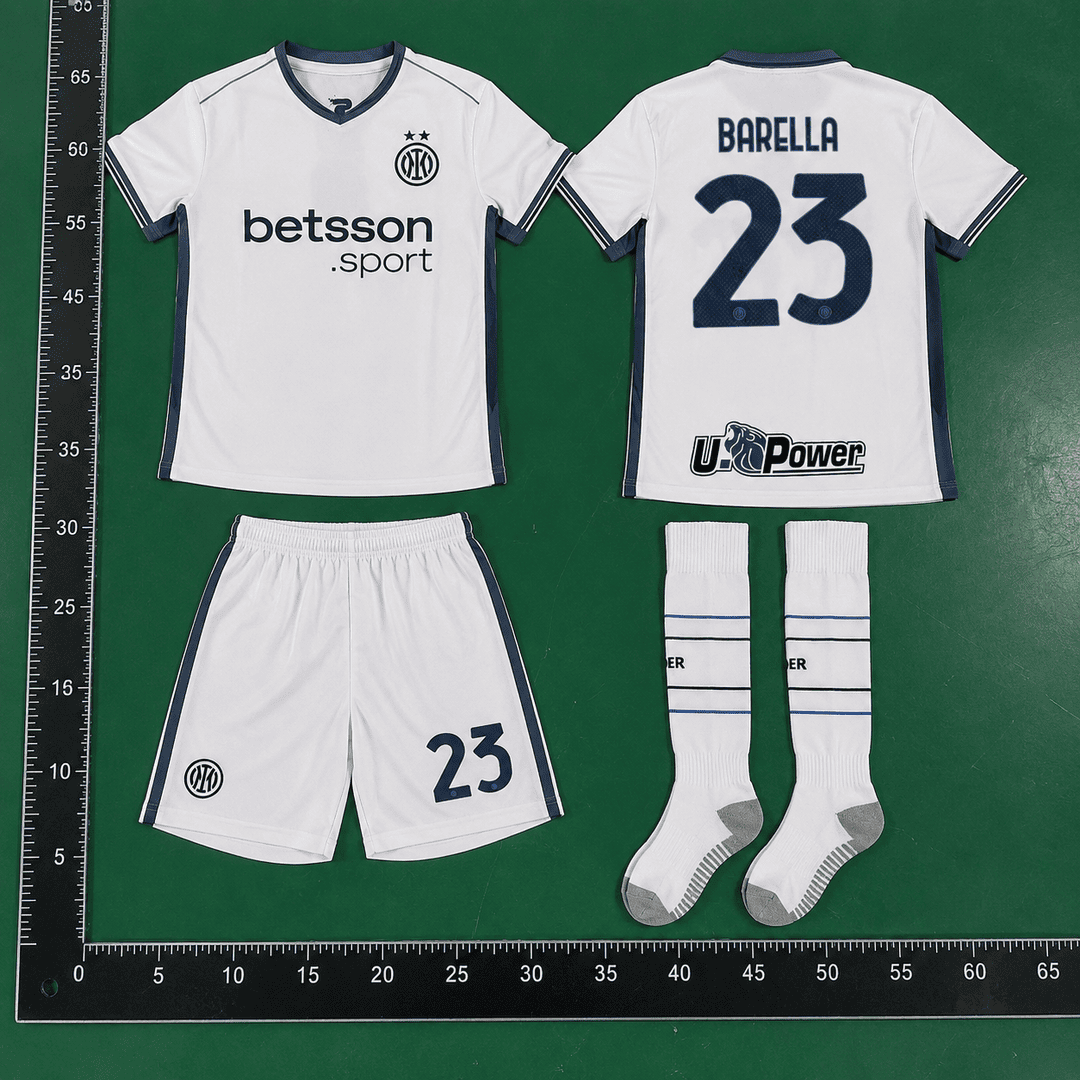
Before buying an inter milan jersey, the first thing to check in QC pictures isn't "does it look right," but whether the images match the exact style and variant you selected. For this item, the verified page name is "Inter Milan White Retro-Style Football Jersey With Numbered and Sock Bundle Options," and the QC page shows two styles, listing SKUs: SPU-LYWOKKCXM9 and SPU-7UZN8TOP0P. Based on this page information alone, you can't confirm each SKU's specific number, size, sock bundle, or physical condition, so always refer to the product detail page and corresponding QC images before paying.

First Confirm Which Item the Pictures Belong To
Once you're on the fashion-reps inter milan jersey detail page, check the product name, color, style, and any number, sleeve patch, size, or bundle options provided. Don't infer details from images on the homepage, category pages, or other product pages.
Find "View QC Photos" on the product detail page and enter the QC gallery from there. The images should correspond to the current product name or product record. If the page shows a different product, a different style, or if the images can't be confirmed to belong to a specific SKU, don't use them as a basis for checking your current order.
It's a good idea to note the following in your order records:
- Product name
- Currently selected style
- SKU or variant identifier
- Color
- Size
- Additional options like number, sleeve patch, or socks
- Product features shown in the QC pictures
The goal of this step is to avoid mixing up different styles on the same page. The current QC page clearly shows two styles, but the provided information doesn't map the two SKUs to specific appearance options, so you can't tell which one includes a specific number, sleeve patch, or bundle just from the SKU name.
Check Four Areas in Order
1. Sponsor Print Position and Integrity
First check if the sponsor print on the chest or front appears where the product detail page says it should, then look at letter spacing, and whether there are obvious gaps, lifting, or large glue bleed along the edges. QC pictures can help you document these visible conditions, but they can't prove the print's long-term durability or authenticity.
Try to use both a flat front view and a close-up when checking. If you only have a distant shot and can't see the print edges clearly, ask for a close-up supplement rather than assuming a blurry area is fine.
2. Sleeve Patch Edges and Position
If you selected a variant with sleeve patches, first confirm the QC picture actually shows the patch, then check if it's positioned flat and if there's obvious loose stitching or curling at the edges. If your variant doesn't include a sleeve patch, don't treat patches in other style images as part of your order config.
If you only have one sleeve, cuff, or a distant angle, you can't fully assess the other sleeve's patch. When key angles are missing, the reasonable step is to request a supplement, not substitute the product main image for QC evidence.
3. Collar and Size Label
Check if the collar structure is visible, whether the size label appears, and record any readable size information on the label. If the label is missing, hidden by the shirt, or too blurry, it only means "couldn't verify from the picture," not that the actual size is definitely correct.
The size label only helps confirm label information; it doesn't substitute for measurements. If QC pictures don't provide chest width, length, or sleeve length measurements, don't use them to judge fit or suitability for a particular body type.
4. Left/Right Body and Main Stitching
Look at the front, back, and sleeves together, focusing on any obvious height differences between the left and right body, visible misalignment of seam lines, and protruding threads near the collar, cuffs, or side seams. Record only what you actually see in the picture; don't write "no flaws" when the picture just doesn't show them.
If you only have one limited-angle QC picture, you can only assess the visible area from that angle. If there are no photos of the back, inside, or underarms, those areas remain unverified.
Record Results Using Visible Evidence
You can organize your QC conclusions in a table like this to avoid turning editorial judgments into product facts:
| Check Item | What You Can Record from QC Pics | What the Picture Can't Prove |
|---|---|---|
| Sponsor Print | Position, whether it's in frame, obvious visible edge issues | Long-term durability, material strength, authenticity |
| Sleeve Patch | Presence, position, whether edges are clearly visible | Actual condition of unphotographed side, long-term peeling risk |
| Size Label | Whether label is in frame, readable text or size | Whether actual dimensions match, whether it fits |
| Stitching & Flaws | Loose threads, misalignment, or stains in visible areas | Unphotographed areas, fabric feel, durability |
Use descriptions like "visible in front picture," "label not clear," "right sleeve not photographed." Avoid conclusions like "authentic," "flawless," or "reliable quality" that go beyond what the image evidence supports.
When to Request More Photos and Hold Off Payment
If any of the following occurs, request additional photos from the seller and pause payment or further processing until key information is confirmed:
- QC pictures can't confirm they belong to the current inter milan jersey, not another style on the same page
- Colors or structure in the picture don't match the selected variant
- You selected a sleeve patch, but the corresponding sleeve doesn't have a clear photo
- Sponsor print is obscured, preventing position and edge checks
- Size label isn't in frame or the text is completely illegible
- Only front distant shots, no back, sleeve, or key seam areas
- Pictures show a number, patch, or bundle that doesn't match your order selection
- You spot obvious stains, damage, loose threads, or print anomalies, but no closer local view
Make your request specific to the area, like "Please supplement with a close-up of the current SKU's front sponsor print, both cuffs, and the size label," rather than just "make it clearer." That way it's easier to tell if the supplement actually covers the missing evidence.
What the Pictures Can't Confirm
Even if these QC pictures clearly show the appearance, they alone can't prove fabric feel, fit, changes after washing, durability, or authenticity. They also can't replace actual measurements or guarantee that unphotographed areas are problem-free.
Therefore, QC pictures are best used to confirm that the style, color, prints, patches, labels, and visible flaws match your order selection. For anything that can't be verified from photos, keep it marked as unconfirmed and get the appropriate evidence before paying or shipping.
Article Image