 Elena Papadakis
Editor-in-Chief
Verify Christian Louboutin Coupons on Fashionreps
Define the Specific Task of Verifying Coupon Stacking If you're planning to view Christian Louboutin shoes through fashion-reps, what you really need to confirm isn't the reference price on the page, but which discounts the shopping agent ultimately accepts in the cart and checkout pages. This article is for buyers who want to verify coupons, product discounts, service fees, and international shipping costs. After reading, you should be ab
Updated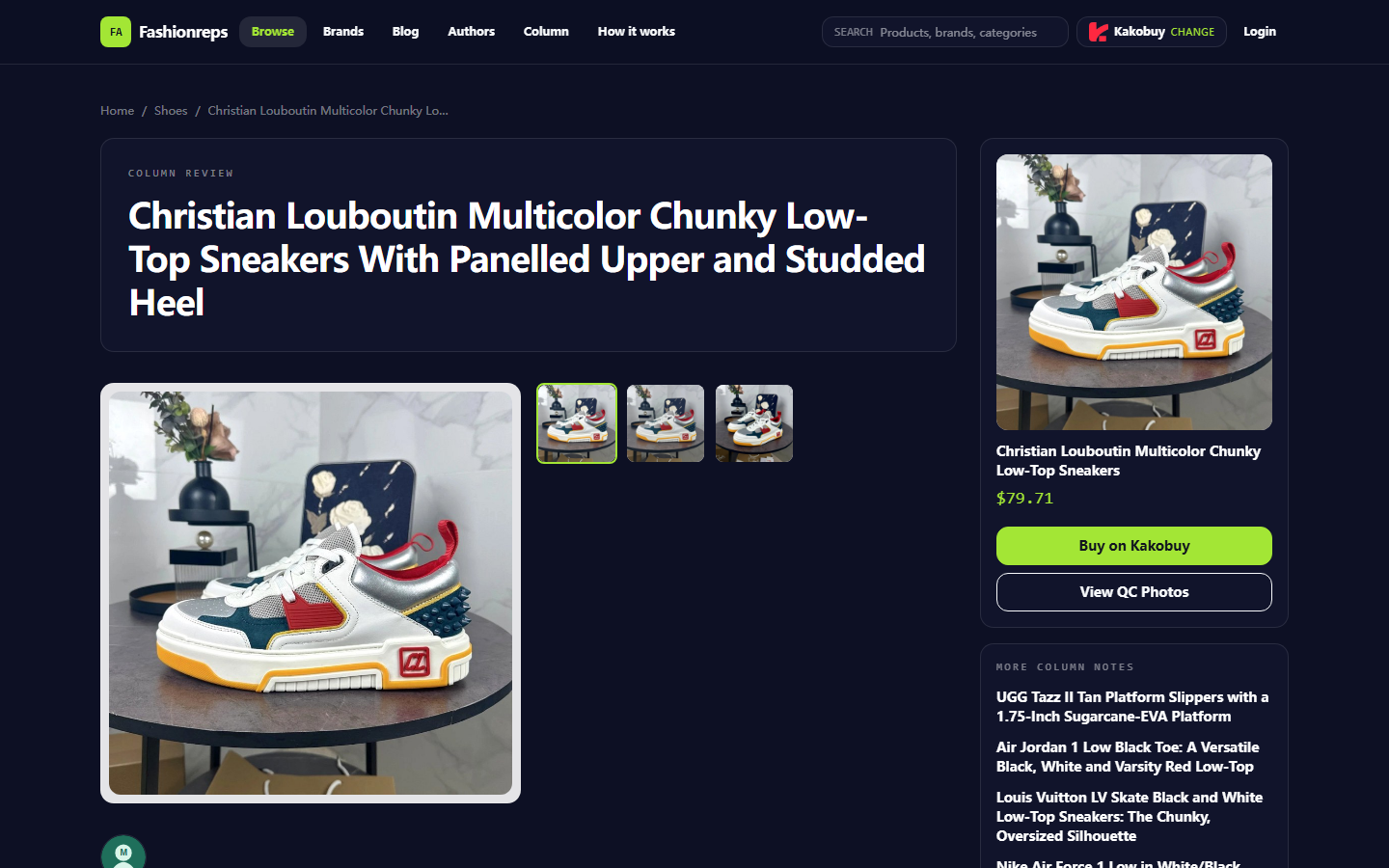
Define the Specific Task of Verifying Coupon Stacking
If you're planning to view Christian Louboutin shoes through fashion-reps, what you really need to confirm isn't the reference price on the page, but which discounts the shopping agent ultimately accepts in the cart and checkout pages. This article is for buyers who want to verify coupons, product discounts, service fees, and international shipping costs.
After reading, you should be able to do four things: lock in product conditions, record coupon rules, check whether discounts can be stacked, and save the final amount due on the checkout page. This article does not apply to refund disputes after payment is completed, nor does it replace the latest policy explanations from the destination country's taxes, import restrictions, or agent platform.

The page information in the image was updated on October 21, 2026, showing Christian Louboutin Multicolor Chunky Low-Top Sneakers With Panelled Upper and Studded Heel. The reference product price shown on the page is $79.71, but the page also states that service fees and international shipping costs need to be confirmed on the shopping agent's website, so this is not the final amount due.
Lock in the Style, Color, Size, Quantity, and Visible Amounts on the Current fashionreps Product Page
First, enter from the specific product page on fashion-reps; don't put Christian Louboutin shoes of different colors or materials into the same discount calculation sheet. The page information shows that this style is a multicolor paneled low-top sneaker, featuring white, silver, teal, red, and yellow visual elements, with a studded heel and chunky sole structure.
Before starting to check coupons, record the following:
- Product page name and URL
- Specific color or colorway
- Selected size
- Quantity
- Reference product price shown on the page
- Currency of the displayed price
- Page update time or your actual verification date
- Currently selected shopping agent
The size information on the page is conflicting; don't skip size verification just because the discount amount looks right. Before placing an order, ask the seller or shopping agent for actual measurements such as insole length and outsole length, and confirm that the measurement object matches the current colorway. Coupons cannot compensate for the return and exchange costs caused by size errors. 👟
Record Coupon Claim Conditions, Usage Thresholds, Validity Periods, and Exclusions
The current page information does not provide verifiable valid coupon codes, claim entrances, minimum spending requirements, usage periods, or applicable product lists. Therefore, it cannot be claimed that there is a specific Christian Louboutin exclusive discount, nor can it be inferred that the buyer can definitely save a certain amount.
After entering the selected shopping agent's website, record the coupon details item by item:
- Coupon code or claim method
- Whether login, account binding, or specific tasks are required
- Minimum product amount or minimum order amount
- Whether the threshold is calculated based on product amount, amount including service fees, or amount including shipping costs
- Applicable currency and region
- Effective time and expiration time
- Whether it is limited to new users, specific accounts, or specific payment methods
- Whether brand products, shoes, special-priced items, or proxy orders are excluded
- Whether it is limited to one coupon per order
- How the discount is handled in case of cancellation, refund, or partial return
If the coupon only says "usable on the entire site," you should still check the complete rules. The platform may exclude brands, agent purchasing, international shipping, value-added services, or specific routes. Pop-ups, chat messages, or old screenshots that do not show complete conditions are not sufficient to prove that the coupon is currently valid. 🔎
Check Whether Coupons Can Be Used Together with Page Discounts, Service Fees, or Other Offers
Discount stacking must be verified in the current order, not inferred from other products, other accounts, or past activity results. It is recommended to follow the order below:
- First lock in the product, colorway, size, and quantity; do not change product conditions while testing coupons.
- Record the product subtotal shown in the cart when no coupon is used.
- Check whether the cart automatically adds product discounts or activity reductions.
- Enter or claim the coupon, and record whether the discount is successfully applied.
- Check whether the coupon reduces the product amount, or only reduces service fees, handling fees, or other specified fees.
- Check whether the page indicates that the coupon is mutually exclusive with other discounts.
- Re-verify the product subtotal, discount amount, service fees, international shipping costs, and possible additional fees.
The cart showing "used" does not mean all discounts have been stacked. Common situations include: product discounts are canceled, coupons only apply to some eligible products, service fees do not participate in discounts, or coupons become invalid after entering the checkout page. If the discount field on the checkout page differs from the cart, the checkout page visible before payment should prevail, and page records should be saved.
Verify Discount Fields and Final Payment Fields Item by Item in Cart and Checkout Pages
You can use the following checklist to avoid staring only at a prominent "discount" number:
| Verification Item | What Needs to Be Confirmed |
|---|---|
| Product subtotal | Product amount corresponding to the current style, size, and quantity |
| Product discount | Whether it comes from page activity and is still retained |
| Coupon discount | Coupon code, applicable scope, and actual reduction amount |
| Service fee | Whether it participates in discounts and is recalculated on the checkout page |
| International shipping cost | Whether shipping route, package weight, or volume changes affect the amount |
| Taxes and other fees | Whether the page already includes them, or they are still borne by the recipient |
| Final amount due | Total amount and currency shown on the page before payment |
Take screenshots or record the order status with and without coupon separately, but be sure to cover names, addresses, phone numbers, order numbers, payment information, and other personal data. Do not publicly share complete shipping labels, passports, bank cards, or account credentials.
If the platform still shows "pending confirmation," "estimate," or "calculated later" before submitting the order, you cannot write the current figure as the final amount due. Record whether the amount is a product reference price, cart estimate, or pre-payment confirmation price. 💳
Mark Currency, Page Time, Calculation Basis, and Fees Not Yet Disclosed
The available page information only shows a reference product price of $79.71, and explicitly indicates that service fees and international shipping costs need to be confirmed on the shopping agent's website. This figure can serve as a starting point for comparison, but it cannot be directly reduced by an unverified discount percentage, nor can it be treated as the total price including shipping, taxes, and after-sales costs.
It is recommended to note in your own records:
- Verification date and time zone
- Currency shown on the page
- Source page of the product reference price
- Selected shopping agent
- Coupon rule page or display location within the order
- Product subtotal in cart and checkout pages
- Whether service fees and international shipping costs have been confirmed
- Who bears the taxes, and whether they are still subject to confirmation by destination customs or carrier
- Whether the page shows any prompts about price, inventory, or rule changes
Prices, inventory, discount rules, shipping costs, and taxes may change. Even if the same product page still exists, it does not mean the previous checkout amount can continue to be used. After reopening the cart, check the coupon status and validity period again. 📅
When There Are No Current Official Rules, How to Change to a Verification Process Without Fabricating Savings Amounts
When the shopping agent does not publicly disclose current coupon rules, or the coupon entry cannot be stably displayed after logging in, the safest result is not to estimate "how much you might save," but to mark the order as pending verification. You can ask the platform's customer service specific questions:
- Does this coupon apply to the current Christian Louboutin shoe order?
- Is the threshold calculated based on product subtotal or total order amount?
- Can product discounts, coupons, and service fee reductions be used simultaneously?
- Are international shipping costs, taxes, and value-added services excluded?
- How is the discount amount recalculated in case of partial refund or return after payment?
- Does the total shown on the checkout page already include currently confirmable fees?
Only when the platform shows actual reductions in the current account and current order, and the checkout page retains those reduction fields, can the discount amount be recorded as verified. Verbal promises from customer service, old activity screenshots, other users' order amounts, and search result summaries cannot replace current order evidence.
After Completing Evidence Verification, Proceed with Checkout, Follow Up, or Hold Off
After completing the verification, you can proceed based on three outcomes:
- Continue checkout: Product conditions, coupon status, service fees, shipping costs, and pre-payment total are all displayed, and you accept the possible changes in taxes and after-sales conditions.
- Follow up before deciding: The coupon is displayed, but service fees, international shipping costs, taxes, or return/exchange responsibilities are still unclear.
- Hold off on ordering: The coupon cannot be confirmed, the checkout amount changes repeatedly, or size measurement information is still insufficient.
Don't blindly add products just to meet the coupon threshold. Combining orders may reduce some fixed operating costs, but it may also increase package value, volumetric weight, and single-loss risk; splitting orders may increase fixed fees, but may be more suitable for route restrictions, size restrictions, or after-sales handling. Whether it's worth stacking purchases should be calculated based on the current order sample, not applied with a one-size-fits-all conclusion.
This verification does not have enough information to confirm available coupon codes or specific savings amounts. After completing the process, the most valuable records are the actual order subtotal before payment, actual reduction fields, service fees, international shipping costs, known taxes, and undisclosed risks. Only then can you judge whether the savings are worth bearing the rule changes, size uncertainty, and after-sales costs.